Find.Scan.Secure.That'sWatchTower OS
Find businesses whose websites are failing and arrive with the proof. Then monitor performance, SEO, security, uptime and authorized pen tests for every site you take on — with an AI assistant that explains exactly what to fix.
No credit card required for the Starter plan.
Performance
last scan
SEO
last scan
Security
last scan
Uptime
last scan
6 scan types
real checks, no mocks
50
checks in one lead audit
8
audit categories scored
22
pen test check categories
6
alert channels
This is the actual product
Real screenshots of real pages, not mockups. What you sign up to is what is on this page.
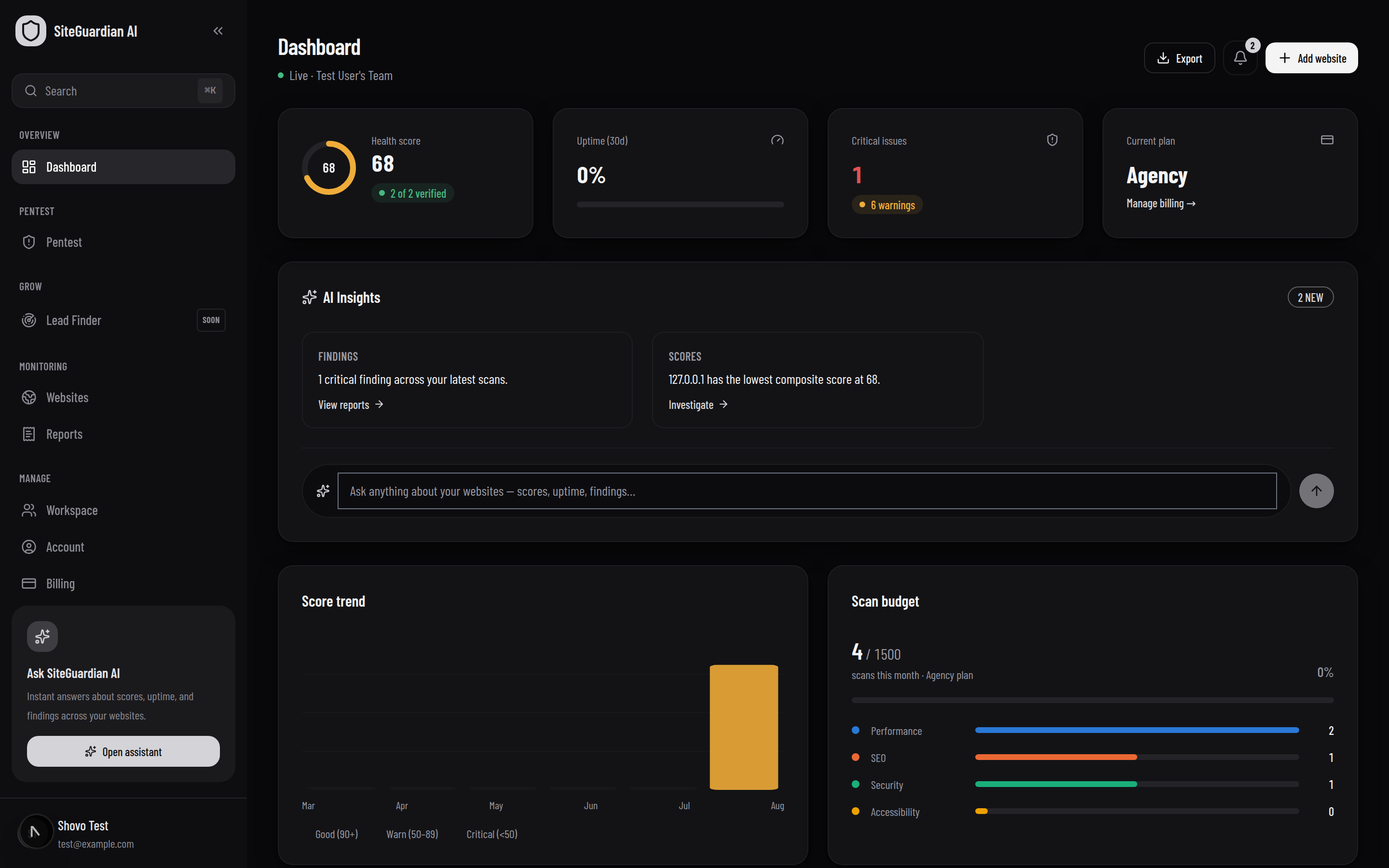
Every site, one health score
Composite health, uptime, open criticals and scan budget in one view — with an AI summary of what changed since the last run.
Monitoring keeps clients.
Lead Finder gets them.
Search a market, see whose website is failing and exactly how, and arrive with the proof already written. Searching is on every plan, including the free one.
Find them
Riverside Dental Care
Dentist
Brahmaputra Smile Clinic
Dentist
City Dental Surgery
Dentist
Search any market by trade and place. Filter to businesses with no website at all — the easiest pitch there is — or to the ones whose site you can audit.
Prove it
One click runs 50 checks across eight categories — speed, mobile, security, search, accessibility, contact, email deliverability and infrastructure. You arrive knowing more about their site than they do.
Write it
Two things on riverside.example worth a look
Hi — I had a look at your site this morning. Two things stood out. It has no viewport tag, so on a phone it loads at desktop width and visitors have to pinch to read it — and most people searching for a dentist are on a phone…
The second is your email setup: the domain has no DMARC record, which is why some of what you send lands in spam. Both are quick fixes — happy to show you.
AI turns the findings into a real email — what is wrong, what it costs them in plain English, and what fixing it gets them. Their address is pulled from their own site. Send it from here.
The audit, in full
One click on a prospect reads their homepage, their robots.txt, their sitemap, their TLS certificate and their public DNS records — the same things any browser, crawler or mail server already requests. Nothing probes for admin panels or vulnerabilities: they have not agreed to be tested, and that line does not move.
Speed & performance
7+- Response time
- Page weight
- Render-blocking scripts
- Compression
- Caching rules
- Modern image formats
- Lazy loading
Mobile experience
3+- Viewport tag
- Pinch-to-zoom disabled
- Fixed desktop width
Security & trust
8+- HTTPS
- Certificate expiry
- http → https redirect
- Mixed content
- HSTS
- CSP
- Clickjacking protection
- Version disclosure
Search visibility
9+- noindex tag
- Title length
- Meta description
- Canonical URL
- Structured data
- LocalBusiness schema
- robots.txt
- sitemap.xml
- Open Graph
Accessibility
4+- Alt text
- Language declared
- Form labels
- Descriptive link text
Getting in touch
5+- Email on the page
- Phone on the page
- Social profiles
- Privacy policy
- Custom 404
Email & domain
4+- SPF record
- DMARC policy
- MX records
- CAA records
Infrastructure
6+- Tech stack
- Outdated jQuery
- Dead Universal Analytics
- CDN
- Redirect hops
- HTTP/3
Four findings that start conversations
Most audit tools hand you a list of things a business owner cannot act on and does not care about. These are the ones that get replies.
Their site is telling Google to ignore it
A stray noindex tag — usually a staging setting nobody turned off — keeps a site out of search results entirely. It explains "we get no enquiries" on its own, and almost nobody knows it is there.
Their certificate expires in nine days
The only finding with a deadline attached. When it lapses, every visitor gets a full-page browser warning instead of the site. Telling someone this a week early is not a sales email, it is a favour.
Their invoices are going to spam
No SPF record means receiving mail servers have nothing confirming their mail is genuinely theirs. No DMARC means anyone can send email pretending to be them. Neither is visible from the website.
Their analytics stopped working in 2023
Universal Analytics stopped processing data in July 2023. A site still carrying only a UA tag has had empty reports ever since — and the owner is usually still quoting numbers from it.
How the limits work
Searching is on every plan, including the free one. Each search returns up to 10 or 20 businesses depending on your plan, and replaces the previous results — anything you save or write on is kept in the Pipeline.
Audits are counted per lead per month, so re-running one on the same prospect does not cost you a second audit. A one-minute cooldown stops the same site being fetched repeatedly.
AI outreach is counted per lead per month too. You can always open a draft in your own mail client, on any plan, whether or not sending from the app is included.
Sending is capped per day rather than per month. That is a spam control, not an upsell: a month's allowance leaving in one minute is what gets a sending domain blacklisted.
Every check is real — no mocks
Each scan runs against your live site. Nothing here is a placeholder waiting on a future integration.
Performance
Real Core Web Vitals and load timing from an actual headless render.
SEO
Meta, headings, sitemap and indexability — checked against your live page.
Security
TLS, security headers, cookie flags and exposed-file checks.
Lead Finder
Search a market, audit a prospect’s site, and have AI write the outreach email.
Accessibility
Alt text, language and screen-reader basics on every scan.
Broken links
Dead links, unreachable hosts and long redirect chains, graded by impact.
Uptime & monitoring
Uptime %, response time and a real downtime incident log.
Email deliverability
SPF, DMARC, MX and CAA — why their invoices keep landing in spam.
Deep recon scan
Screenshot, tech stack, endpoints, passive DNS and a risk profile.
Authorized pen testing
Opt-in, read-only probes with a full audit trail — never destructive.
AI assistant
Site-aware answers that explain exactly what to fix, and how.
Reports & exports
PDF and CSV, scheduled daily, weekly or monthly, carrying your own logo.
Live in three steps
Add your website
Point WatchTowerOS at any domain your team manages.
Prove ownership
Verify with a DNS record, file, or meta tag — a hard gate nothing bypasses.
Monitor continuously
Scans, uptime checks and alerts run on a schedule matched to your plan.
Built for people who ship other people's websites
Agencies
A workspace per client, each with its own sites, members and billing. Reports go out carrying your logo, not ours.
- Client-safe roles
- White-labelled PDFs
- Switch workspace in one click
Freelancers
Prove the work. Hand a client a measured before-and-after instead of an assurance that it feels faster now.
- Score history
- One report per site
- Free plan to start
In-house teams
One place where marketing, engineering and security look at the same numbers and stop arguing about whose problem it is.
- Per-person permissions
- Audit log
- API access
Everything, listed
Including the two things that are not built yet — in the same list, not in a footnote.
Monitoring
- Uptime checks with response-time history
- Performance scoring — Core Web Vitals, measured in a real browser
- SEO: metadata, headings, canonicals, indexability
- Security headers, TLS configuration and cookie flags
- Accessibility: alt text, language, screen-reader basics
- Broken links and redirect chains
- Score history, so you can see what a change actually did
Security & pen testing
- Authorised penetration testing, recorded in an audit log
- 22 active check categories mapped to the OWASP Top 10
- SQL injection, XSS, CSRF, traversal, open redirect
- SPF/DMARC, HTTP methods, GraphQL introspection, Host header
- Passive recon: open ports, subdomains, blacklists, CVEs
- A live engine log while the engagement runs
- A dedicated engagement report that states what was NOT tested
Reporting
- One full PDF report per site, carrying your workspace logo
- Every finding with steps to fix it and how to verify the fix
- Scheduled delivery — daily, weekly or monthly
- Send to people who have no account, like a client
- CSV export of everything
Teams & workspaces
- A separate workspace per client, with its own plan and billing
- Shareable workspace ID with request-and-approve joining
- Six roles, plus per-person permission overrides
- Invitations by email or link
- Two-factor authentication, required to connect a website
- Session list you can revoke device by device
AI assistant
- Ask questions about your own scan data in plain language
- Explanations of why a score moved
- Copy-pasteable remediation for a specific finding
- Runs on Anthropic or OpenRouter — your key, your choice
Lead Finder
- Search any market by niche and location, powered by Google Places
- Filter to businesses with no website at all — the easiest pitch there is
- Filter by star rating to find the ones already unhappy
- One-click audit of a prospect’s homepage, scored on 10 checks
- A pipeline with statuses, notes and assignment
- Searches replace results; anything you save or annotate is kept
Alerts & integrations
- In-app inbox you can read, mark and clear
- Email, Slack, Discord, Telegram, SMS and generic webhooks
- Per-event channel choice — outages loud, completed scans quiet
- A REST API with scoped keys
- bKash, Nagad and Binance payment, priced at the live BDT rate
Card checkout
ComingPaddle is next. Manual payments are approved by a person today, usually within a few hours.
A security tool has to be safe itself
Credentials encrypted at rest
API keys, SMTP passwords and two-factor secrets are AES-256-GCM encrypted before they touch the database. A stolen dump does not hand anyone your integrations.
Ownership proved before anything runs
Every site passes DNS, file or meta verification first. That is what stops our scanners being pointed at a stranger.
Pen testing you have to authorise
A recorded authorisation naming the target and the scope, your name in the audit log, and probes that are read-only by design.
Reports that admit their limits
A category with no check behind it is printed as "not tested", never folded in with the passes. A clean report that hides its coverage reads as an all-clear.
Plans that scale with your team
Start free. Upgrade when you need more sites, AI credits, or pen testing.
Free
For a single site and the essentials.
Free
Monitoring
- 1 website
- 30 scans / month
- 2 team members
- Daily scans
- 250 MB report storage
Lead Finder
- No searches / month
- Up to 4 results per search
- 5 prospect site audits / month
- No AI-written emails / month
- No outreach sends / day
Included
- Lead Finder
- Prospect site audits
- AI outreach writer
- Authorized pen testing
- PDF reports
- Scheduled reports
- AI assistant
Starter
For growing teams that need AI insight and more sites.
$9/mo
Monitoring
- 2 websites
- 50 scans / month
- 2 team members
- Scans every hour
- 2 GB report storage
Lead Finder
- 10 searches / month
- Up to 10 results per search
- 20 prospect site audits / month
- 20 AI-written emails / month
- 20 outreach sends / day
Included
- Lead Finder
- Prospect site audits
- AI outreach writer
- Authorized pen testing
- PDF reports
- Scheduled reports
- AI assistant
Pro
For agencies managing many client sites, with pen testing.
$19/mo
Monitoring
- 5 websites
- 100 scans / month
- 5 team members
- Scans every 30 minutes
- 10 GB report storage
Lead Finder
- 50 searches / month
- Up to 10 results per search
- 100 prospect site audits / month
- 100 AI-written emails / month
- 100 outreach sends / day
Included
- Lead Finder
- Prospect site audits
- AI outreach writer
- Authorized pen testing
- PDF reports
- Scheduled reports
- AI assistant
Agency
For large organizations with dedicated support needs.
$49/mo
Monitoring
- 20 websites
- 1500 scans / month
- 20 team members
- Scans every 15 minutes
- 50 GB report storage
Lead Finder
- 100 searches / month
- Up to 20 results per search
- 400 prospect site audits / month
- 400 AI-written emails / month
- 400 outreach sends / day
Included
- Lead Finder
- Prospect site audits
- AI outreach writer
- Authorized pen testing
- PDF reports
- Scheduled reports
- AI assistant
Business
Every feature, no caps.
$99/mo
Monitoring
- 100 websites
- 5000 scans / month
- 100 team members
- Scans every 5 minutes
- Unlimited report storage
Lead Finder
- 200 searches / month
- Up to 20 results per search
- 1k prospect site audits / month
- 1k AI-written emails / month
- 963 outreach sends / day
Included
- Lead Finder
- Prospect site audits
- AI outreach writer
- Authorized pen testing
- PDF reports
- Scheduled reports
- AI assistant
Questions, answered
You prove ownership with a DNS TXT record, an uploaded file, or a meta tag — a real check against your live domain, not a self-reported checkbox. Scans, pen testing, and the AI assistant all stay locked until verification succeeds.
Ready to see your own scores?
Add a site, prove you own it, and get real performance, security and uptime data in minutes.
Create your free account